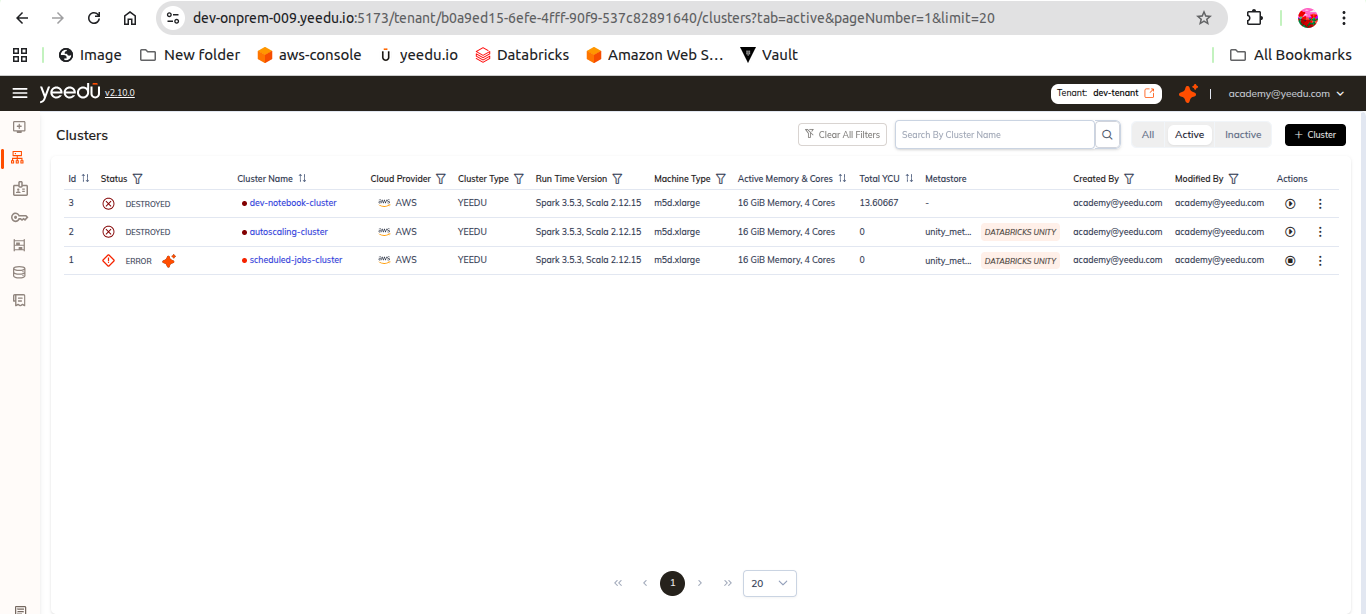
Cluster Dashboard
The Cluster page displays a comprehensive list of clusters associated with the respective tenant. It provides detailed insights into each cluster, including their status and YCU consumption.
Users can access Clusters by selecting the ‘Clusters’ option in the Yeedu navigation panel.
The clusters landing page displays the following information:
- ID – Unique cluster identifier
- Status – Current status
- Cluster Name – Name of cluster
- Cloud Provider – AWS / Azure / GCP
- Cluster Type – Yeedu / Standalone / Cluster
- Runtime Version – Spark + Scala version
- Machine Type
- Active Memory and Cores
- Total YCU
- Metastore
- Created By
- Modified By
- Action Tab – Start/Stop/Destroy/Clone